
Your Mac desktop,
beautifully alive.
Orbl turns your wallpaper into a calm, living dashboard: the time, the weather, your focus, your Mac's vitals and your business numbers, there whenever you glance.
Free forever · macOS 14 or later · Apple Silicon · Version 1.11
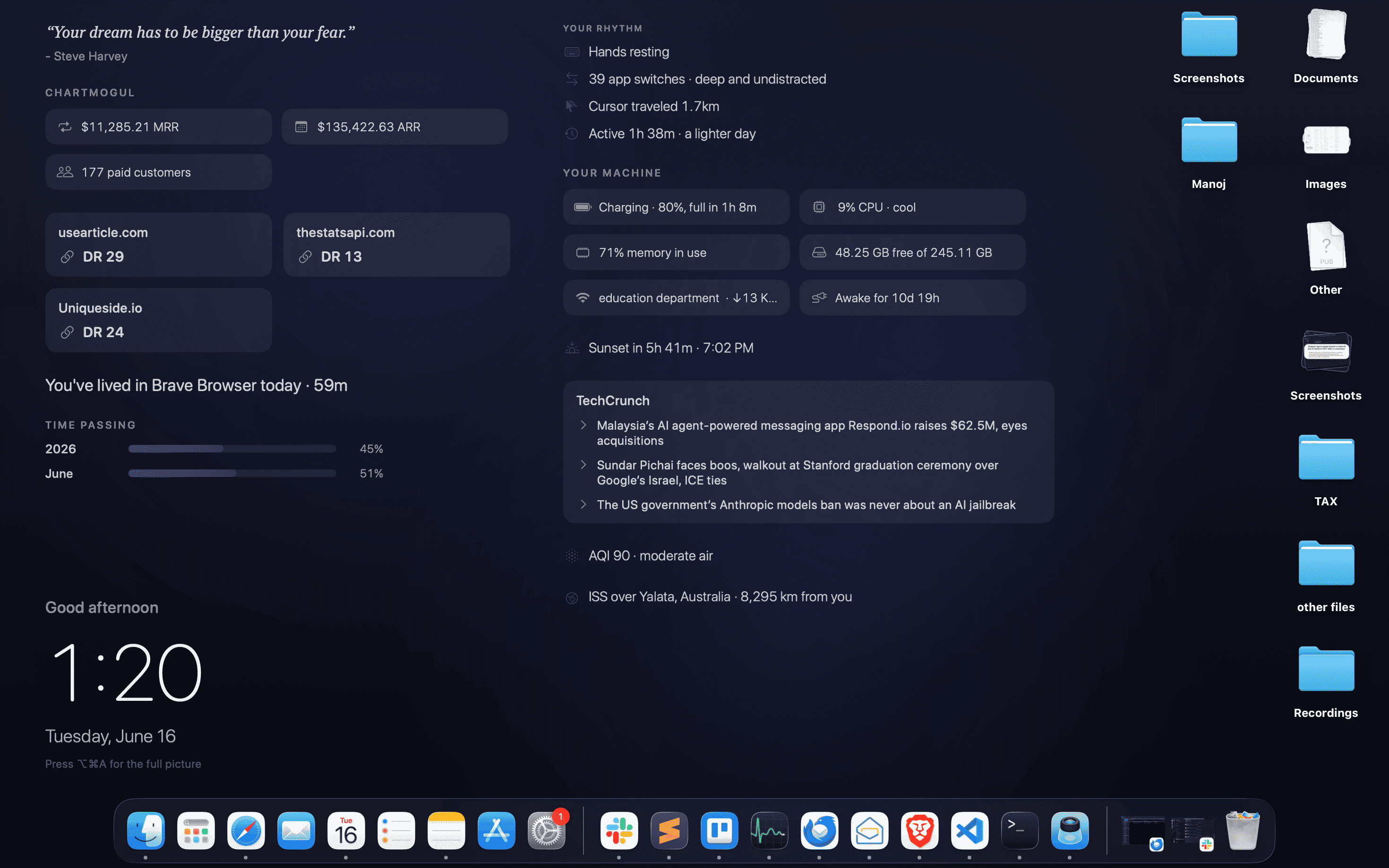
Not a mockup. The actual Orbl wallpaper on a real Mac.
Your numbers from the tools you already use, live on your wallpaper
See it live
Watch your desktop come alive.
No mockups. This is Orbl on a real Mac. A calm wallpaper that quietly mirrors your day.
Everything at a glance
Your whole day, on the one screen you always see.
Every widget is drawn for the wallpaper: light type, calm lines, nothing shouting for attention.
22°C in Lisbon · clear
Next up in 25m, at 3:30 PM
Good morning
9:41
Monday, June 8
Press ⌥⌘A for the full picture
A clock worth looking at
The time, anchored bottom-left in a light, quiet face, with a greeting that follows your day.
Time passing
Time, made tangible
Slim bars for the year and the month. Yes, those are live.
Your machine
Your Mac's vitals
Battery, CPU, memory, disk, Wi-Fi and uptime as tidy chips. No menu bar clutter.
Your rhythm
Typing at your steady pace
39 app switches · deep and undistracted
Cursor traveled 1.7 km
Active 5h 12m · more than usual
Your rhythm
Typing pace, app switches, cursor travel and active time. Framed calmly, never judged.
22°C in Lisbon · clear
Sunset in 2h 14m · 7:02 PM
AQI 18 · good air
ISS over the Pacific
The world outside
Weather, the countdown to golden hour, air quality, and the ISS overhead.
Reminders
2 due today
Send the investor update
Review pricing page
Counting down
Launch day · 12 daysReminders and countdowns
Today's Apple Reminders where you'll see them, and the days until what matters.
“Simplicity is the ultimate sophistication.”
- Leonardo da Vinci
On this day1979 · The first Sony Walkman goes on sale.
Little moments
A thoughtful line each morning, and a small piece of history from this day.
Your devices
Every battery you own
AirPods, keyboards, mice, even non-Apple earbuds. All in one glance.
Try it right here
Calm by default. Everything on demand.
Keep the essentials always visible and tuck the rest behind a shortcut. Press ⌥⌘A or click the desktop, then pick a color.
“Your dream has to be bigger than your fear.”
- Steve Harvey
Where your time went
☁22°C in Lisbon · clear
▸Next up in 25m, at 3:30 PM
Good morning
9:41
Monday, June 8
Press ⌥⌘A for the full picture
Your rhythm
⌨Typing at your steady pace
⇄39 app switches · deep and undistracted
↗Cursor traveled 1.7 km
Your machine
◐Sunset in 5h 41m · 7:02 PM
Revenue
$1,284 earned today
Time passing
GitHub
Integrations
Your business, on your wallpaper.
Paste a read-only API key and your numbers just appear. Formatted beautifully, refreshed quietly, stored in your Keychain.
Revenue
$1,284 earned today
ChartMogul
Seven revenue sources
Stripe, ChartMogul, Lemon Squeezy, Dodo, Gumroad, Polar and TrustMRR.
GitHub · Contributions
8,951 contributions over the last 4 years
Your GitHub years, stacked
3 months to 4 years of contributions, plus stars, followers and open PRs. Private repos too.
For everything else
Any API. One paste.
Paste a cURL, pick the values you care about, name them. Orbl keeps them fresh on your wallpaper.
$ curl https://api.yourapp.com/stats \
-H "Authorization: Bearer ••••••"
Revenue & payments
- Stripe
- ChartMogul
- Lemon Squeezy
- Dodo Payments
- Gumroad
- Polar
- TrustMRR
Developer
- GitHub
- RSS / Atom
- Any API
Audience & social
- Bluesky
- Product Hunt
- Hacker News
SEO
- Ahrefs
Markets & money
- Crypto
- Exchange rates
Integrations are part of Orbl Premium. Keys are read-only and only ever sent to the provider.
Explore integrations →New in 1.11
Meet your desktop pet.
A small companion that lives on your wallpaper. It wanders, sits, looks around, grooms itself, and curls up for a nap when you step away.
Desktop Pet
Strolls, sits, grooms. Naps when you do.
Five to choose from
Cat, dog, monkey, turtle or rabbit, each with its own gait and habits.
Drawn, not sprites
Vector-drawn and animated live: jointed legs, blinks, tail sways, a real walk cycle.
Calm by design
Sits behind your icons, never catches a click, and slows right down asleep.
Made yours
Tune every detail. Watch it react.
Colors, integrations, what shows and what hides. Every change lands on your wallpaper instantly.
Your colors
Paint it your mood.
Let the palette drift with the time of day, or pick a background color and watch the entire theme adapt in real time: text, accents, every widget.
- Follows the light from night to midday
- Ten hand-tuned presets, or any color
- Transparent mode over your own wallpaper
Integrations
Your numbers, live.
Paste a read-only API key and your revenue, followers, and stats appear on the wallpaper. Refreshed quietly, stored in your Keychain, never through a server.
- Read-only keys, stored in Keychain
- Called directly from your Mac
- Formatted beautifully, refreshed quietly
Show & hide
Only what you want.
Flip any widget between always-on, reveal-only, or off, and resize it small, medium, or large. A fluid grid arranges the rest, and never overlaps.
- Always-on, reveal-only, or off
- Small, medium or large per widget
- Auto-flow layout, or drag your own order
A look inside
Set it up in seconds. Then forget it's there.
Open Orbl from the menu bar, then Settings. A calm, native panel with every control where you'd expect it.
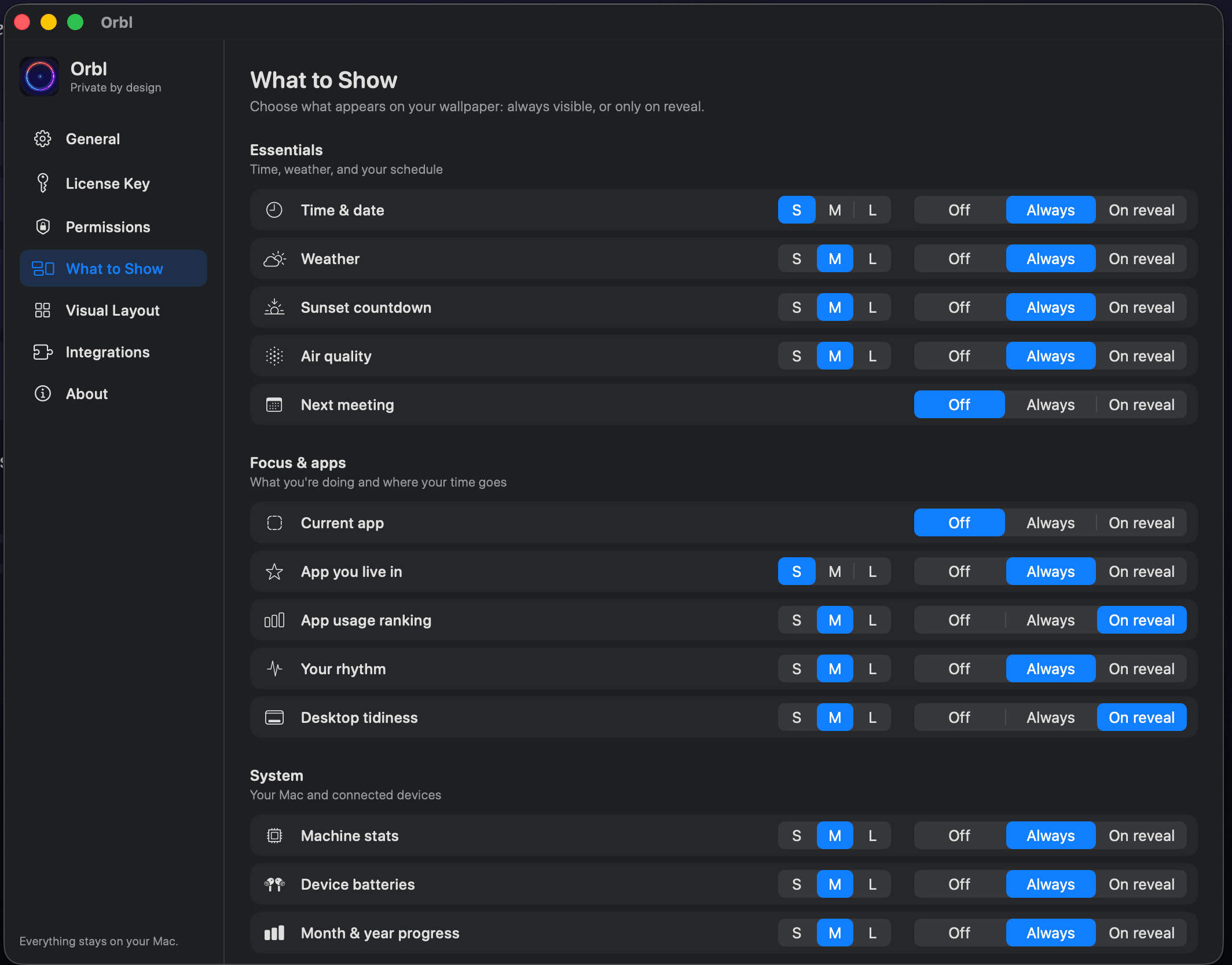
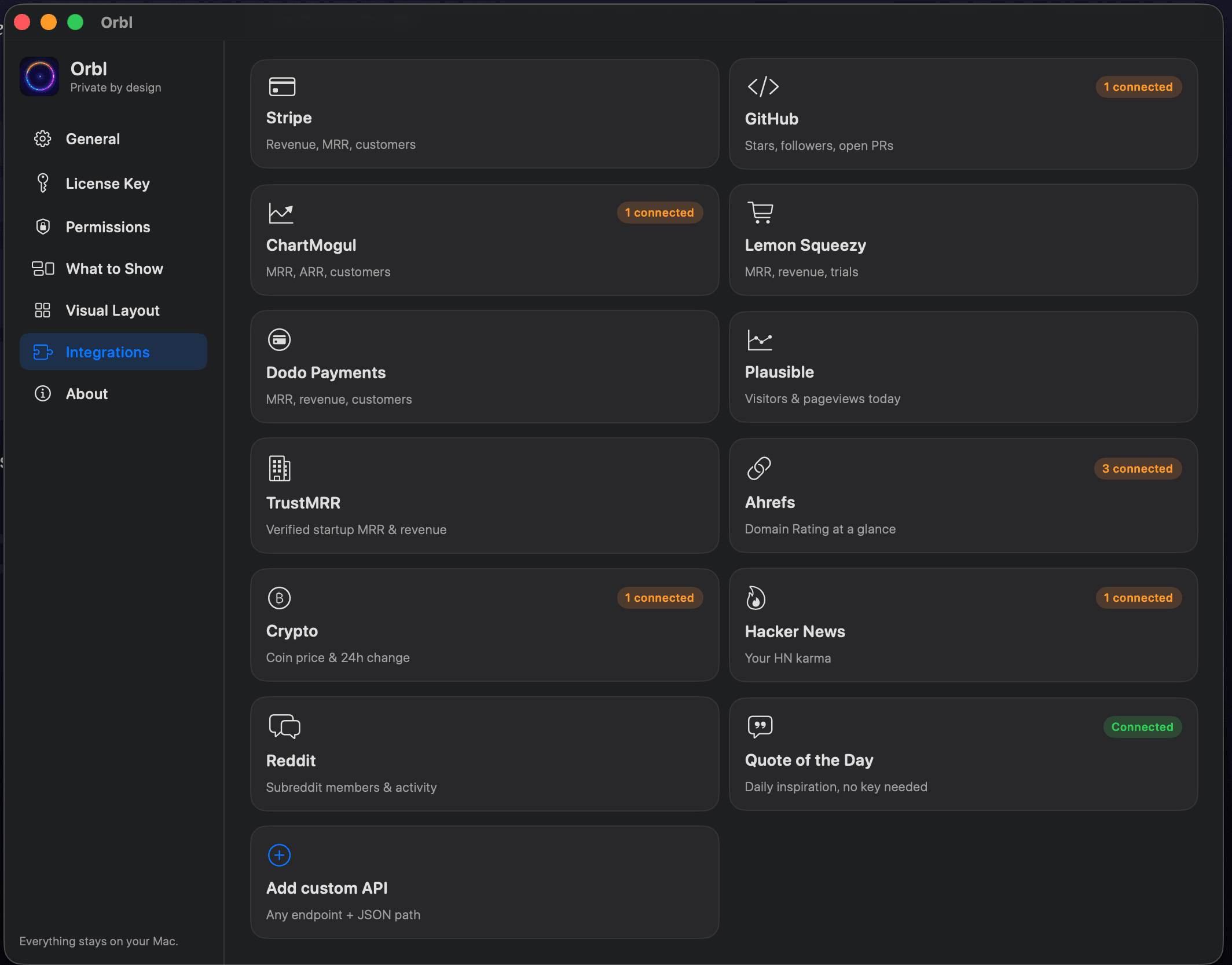
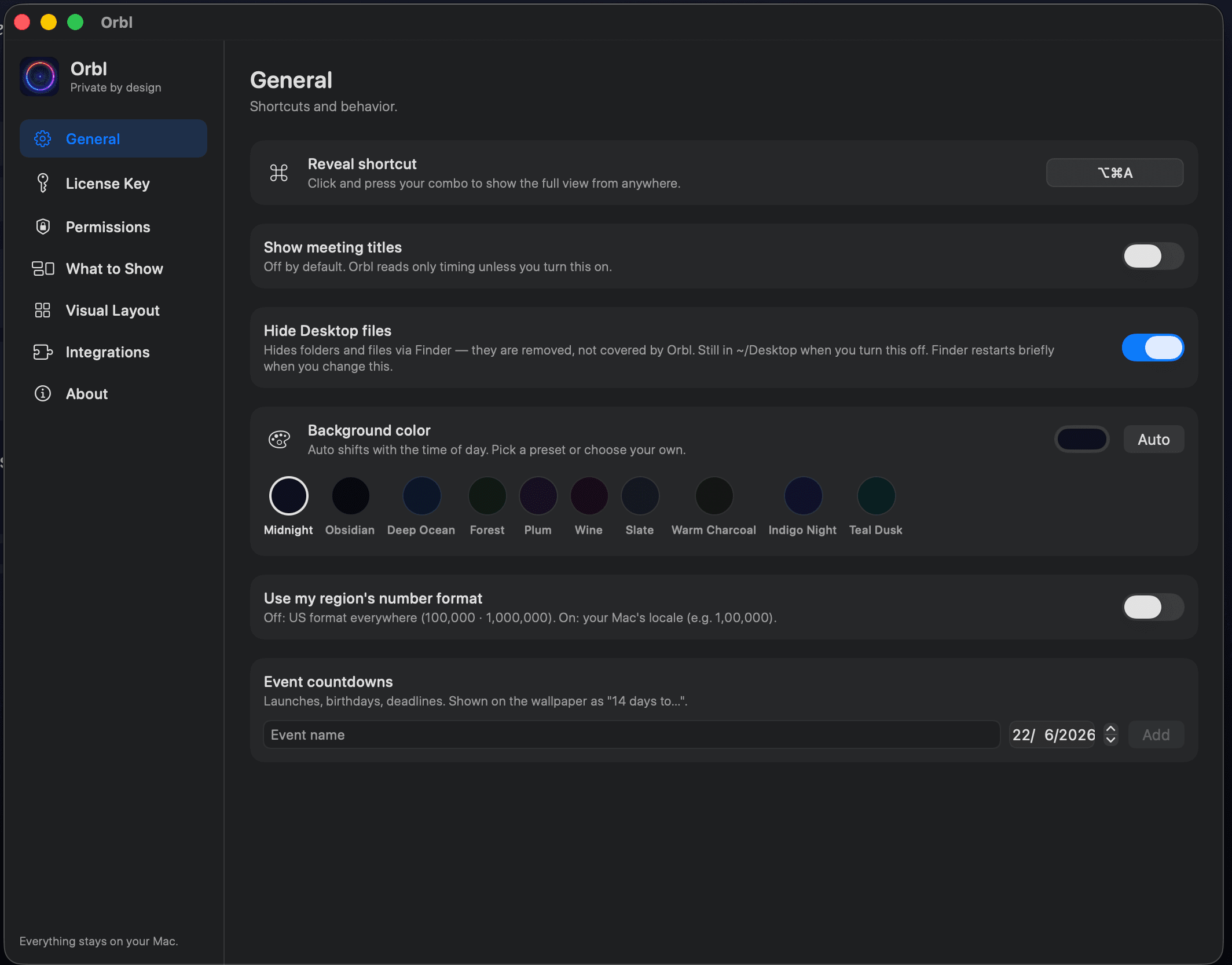
Every widget, your call.
Always-on, reveal-only, or off. Small, medium or large. Build the exact desktop you want to wake up to.
General
Reveal shortcut, open at login, background color & presets, meeting-title privacy, number format, countdowns.
What to Show
Every widget always-on, reveal-only, or off, in small, medium, or large. Grouped by category.
Visual Layout
Auto-flow to fit your screen, or switch to Custom and drag widgets into your own order.
Integrations
Connect read-only keys for revenue, GitHub, feeds, followers and markets. Stored in Keychain.
License Key
Orbl is free forever. Paste a one-time license key to unlock every premium widget.
Permissions
Grant only what you use: calendar, reminders, location. Asked the moment you turn a feature on.
Native. Featherweight. Private.
Built like it shipped with your Mac.
Written in Swift, engineered to be invisible in Activity Monitor. When your screen sleeps, Orbl sleeps too.
~0%
CPU at rest
Staggered sampling. No polling storms.
<100MB
memory
A fraction of a single browser tab.
8–12fps
adaptive ambience
Slower on battery, paused when idle.
0
servers
Everything is computed on your Mac.
What happens on your Mac, stays on your Mac.
No account. No server.
No analytics, no sign-up. Orbl doesn't even know you exist.
Keys stay in Keychain
Integrations call providers directly from your Mac, never through us.
Permissions, only when asked
Calendar, reminders, location. Requested the moment you turn a feature on.
Up and running
Three steps. About a minute.
No account, no setup wizard. Orbl lives quietly in your menu bar, reopens at login, and updates itself in one click.
Download
Grab the free DMG for macOS (Apple Silicon). No account, no email, no card.
Install
Open the DMG and drag Orbl into Applications. Then eject the disk image.
Open once
Launch Orbl and accept the quick welcome. Your wallpaper comes alive instantly.
Pricing
Free, forever. Premium, once.
Every built-in widget is free. One payment unlocks every integration. No subscription.
Orbl
Free
Forever · No account · Version 1.11
- Live wallpaper + every built-in widget
- Clock, weather, sunset & air quality
- Focus, rhythm & deep work
- Machine stats, batteries & sticky notes
- Quote of the day, on-this-day & the desktop pet
- All future app updates, free forever
Orbl Premium
Launch price · first 50$39
$49
One-time · Lifetime · Every integration
- Everything in Orbl, plus:
Revenue on your desktop
Stripe · ChartMogul · Lemon Squeezy · Dodo · Gumroad · Polar · TrustMRR
Meetings & tasks
Calendar · Reminders · Countdowns
Developer
GitHub · RSS · Any API
SEO
Ahrefs Domain Rating
Audience & markets
Reddit · Bluesky · Product Hunt · Hacker News · Crypto · FX
Focus & space
App usage ranking · ISS location
- Every future integration, included
Read-only keys in Keychain · Nothing through our servers
FAQ
Questions, answered.
Something else on your mind? Get in touch.
Is Orbl really free?
Yes. Download Orbl for free and use every built-in widget: clock, weather, focus & rhythm, machine stats, sticky notes, progress bars, the daily quote, on-this-day, and the desktop pet. Orbl Premium adds app-usage ranking, the ISS, meetings & tasks, and every integration.
Is my data really private?
Yes. Orbl is 100% local. Your activity never leaves your Mac, API keys live in the macOS Keychain, and integrations call providers directly from your machine. No account, no server, no analytics.
Will it slow down my Mac or drain battery?
No. Orbl idles near 0% CPU and uses under 100 MB of memory. The ambient background adapts its frame rate to your power state and pauses when you step away.
What is Orbl Premium?
Orbl Premium is a one-time upgrade that unlocks meetings & tasks plus every integration: revenue (Stripe, ChartMogul, Lemon Squeezy, Dodo, Gumroad, Polar, TrustMRR), developer (GitHub, RSS, custom APIs), SEO (Ahrefs), and audience & markets (Reddit, Bluesky, Product Hunt, Hacker News, crypto, currency). Pay once, keep it forever, including future integrations.
Is $39 really lifetime?
Yes. Pay once for Orbl Premium and keep every integration forever, including updates. The $39 price is limited to the first 50 buyers; after that it becomes $49 (still one-time, still lifetime).
What is the desktop pet?
A small animated companion (a cat, dog, monkey, turtle or rabbit) that wanders along the bottom of your wallpaper. It sits, looks around, grooms itself, and naps when you step away. It's vector-drawn and tinted to match your wallpaper, sits behind your Desktop icons, never catches a click, and is off by default: turn it on in Settings → Desktop Pet and choose its size and which monitors and desktops it appears on. It's free.
Does it ask for a bunch of permissions?
Only when needed. Permissions are requested lazily. Calendar access only if you enable meetings, accessibility only for typing rhythm, Keychain only when you add an API key or license.
Give your desktop a pulse.
Free on macOS. Takes a minute. You'll wonder how your desktop was ever empty.
macOS 14 or later · Apple Silicon · Version 1.11